
The Simplest 4-Step Learning Path to Master Any Software Project (Docker, Kubernetes & Beyond)
Learn how beginners can master Docker, Kubernetes, and DevOps using a proven 4-step learning path: run locally → containerize → deploy on a cluster. No overwhelm, just results.

Stop trying to learn everything at once. Here's the structured, beginner-friendly path that actually works — from cloning a repo to deploying on a cluster.
The Problem Every Beginner Faces
You open YouTube. You see tutorials on Docker, Kubernetes, Terraform, Prometheus, CI/CD, ArgoCD…
You don't know where to start. So you try to learn everything — and end up understanding nothing deeply.
Sound familiar?
After working across multiple projects and mentoring developers, I found a single repeatable process that transforms confused beginners into confident engineers.
It's a 4-step learning path — and it works for any modern application.
The 4-Step Learning Path (Overview)
Each step builds on the last. Skip one, and the next step becomes confusing.
Let's break each one down.

Step 1: Pick a Real Open-Source Repository
The goal: Find a real-world project to learn from — not a toy example.
Instead of building something from scratch, start by exploring existing open-source repositories on GitHub.
Why Real Projects?
Real projects teach you things no tutorial will:
How production-grade code is actually structured
How developers organize repositories and services
How dependencies are declared and managed
How microservices communicate with each other
You don't need to understand every single line. Your only goal at this stage is to successfully run the project.
What to Look For
| Category | Examples |
|---|---|
| Web Applications | Django, Express, Rails apps |
| Microservices | Sock Shop, Online Boutique (Google) |
| API Services | REST/GraphQL demo APIs |
| DevOps Demos | ArgoCD example apps, Flux demos |
| Kubernetes Sample Apps | Kubernetes examples repo |
💡 SEO Tip for Developers: Search GitHub with terms like "good first issue" microservices demo or kubernetes sample application to find beginner-friendly repos.
Step 2: Run the Project Locally
The goal: Understand what the application actually does before touching any infrastructure.
This is the most skipped — and most important — step.

Key Questions to Answer at This Stage
What does the application actually do?
Which ports does it expose?
What external services does it need (DB, cache, queue)?
What environment variables are required?
How do different services talk to each other?
Running the application locally gives you the mental model you'll need for every step that follows.
Once the app runs locally — you've hit your first major milestone. Don't rush past it.
Step 3: Containerize It with Docker
The goal: Make the application portable and reproducible across any environment.
The classic developer problem:
❌ "It works on my machine."
✅ Docker: "It works everywhere."
What Containerization Looks Like

Core Concepts You'll Learn Here
Dockerfile — Instructions to build your image
Image Layers — How Docker caches and reuses build steps
Container Networking — How containers communicate
Environment Isolation — Why containers don't interfere with each other
Docker Compose — Running multi-service apps locally
This step teaches you dependency management at a systems level — a critical skill for any DevOps or cloud role.
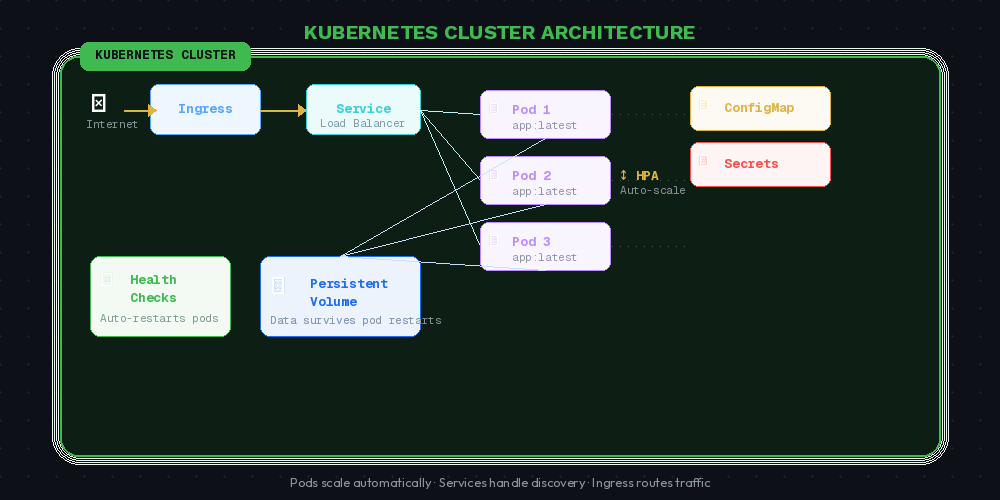
Step 4: Deploy It on a Cluster
The goal: Operate the application like it would run in production.
Once your container works, it's time to scale up.

Real Infrastructure Concepts You'll Learn
| Concept | What It Solves |
|---|---|
| Service Discovery | How services find each other |
| Load Balancing | Distributing traffic across pods |
| Scaling | Running multiple replicas |
| ConfigMaps / Secrets | Managing configuration safely |
| Health Checks | Auto-restarting failed containers |
| Namespaces | Isolating environments (dev/staging/prod) |
This is where you transition from running an application to operating a system.
The Full Learning Progression

What Comes After the 4 Steps?
Only after your app runs successfully on a cluster should you start exploring:
Monitoring — Prometheus, Grafana (track what's happening)
Logging — ELK Stack / Loki (debug what went wrong)
Observability — Distributed tracing with Jaeger or OpenTelemetry
CI/CD — GitHub Actions, ArgoCD, Jenkins
Infrastructure as Code — Terraform, Pulumi
Security — RBAC, network policies, secret management
⚠️ Common Mistake: Beginners jump straight to Prometheus or ArgoCD without having a running application. These tools exist to improve a running system — not replace understanding it.
Why This Approach Works: Bottom-Up Learning
Most tutorials teach top-down — they start with the architecture diagram and work down to the code.
This path is bottom-up:

Bottom-up learning builds intuition. When you eventually look at architecture diagrams, they make sense — because you've already felt each layer.
Quick-Start Checklist
Use this as your progress tracker:
Found a real open-source project to work with
Read the README and understand what the app does
Installed all dependencies and ran it locally
Tested at least one endpoint or feature manually
Written (or understood) the Dockerfile
Built and run a Docker image successfully
Used Docker Compose to run multi-service app
Deployed the app to a local Kubernetes cluster (minikube/kind)
Exposed the service and accessed it from outside the cluster
Ready to explore monitoring and CI/CD tools
Final Thoughts
The engineers who grow fastest aren't the ones who watch the most tutorials.
They're the ones who run real applications, break things, and fix them.
If you can:
✅ Run a project locally
✅ Containerize it with Docker
✅ Deploy it on a cluster
…you already have a stronger foundation than most beginners who've spent months watching videos.
Start small. Run real projects. Learn by doing.
That's the fastest path to becoming a confident cloud-native engineer.
#docker #kubernetes #devops #beginners #cloudnative #softwaredevelopment #learntocode #programming #opensource #containerization
Found this helpful? Share it with someone who's just starting their DevOps journey. 🚀


